
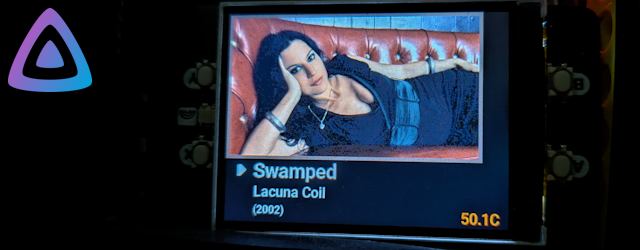
Like approximately every nerd in the world, I have a RaspberryPi sat in the corner of the room gathering dust. Some time ago, in an exciting burst of “I will finally do something with it”, I bought it a Display HAT Mini as a treat. That too, sat gathering dust.
More recently, I cancelled my music streaming subscription due to financial ethical constraints, and thanks to an old external hard drive and even older MP3 library, it was suddenly time for the Raspberry Pi’s “I’ve trained my whole life for this moment”. One JellyFin install later, I had a free and functional streaming service of my very own. But the Display HAT was jealous, and so was born… JellyHat.
WTF is a JellyHat?
In summary, a Python application that sits on the Pi, polls the JellyFin server and displays the current status on the Display HAT. I direct your attention to the banner above. That’s an actual factual photo of my Pi in my home office. I’m sure someone somewhere will be able to geolocate my house based on the temperature, date, and some special quality of the lighting, but that’s a risk I’m just going to have to take.
If you are in the position – and honesly, who isn’t? – of having a Raspberry Pi with both a JellyFin server and a Display HAT, or you just want to see the code, head on over to the repository and have a gander.
So what does it do?
Once JellyHat is running it regularly polls the JellyFin server (once every 5 seconds by default). If there’s nothing playing you get an idle message. After a period of such inactivity it blanks the screen and turns off the backlight. If and when it detects activity, it shows the artwork for the currently playing item and below that shows some metadata – title, artist, year for now. In the corner it shows the onboard temperature (even in the UK a passively-cooled Pi can get worryingly hot when something it thrashing the CPU – say, for example, a newly installed music library being indexed and processed by JellyFin…) If it gets too hot the LED lights up so it doesn’t feel left out before the poor computer melts.
But what if there is more than one session?
Not a problem! My music library is almost entirely chiptunes and video game soundtracks, so I don’t have to worry about my family also wanting access to it.
But other people also exist.
I don’t approve of that, but OK. On the to-do list is handling multiple concurrent sessions. Right now it just takes the first one in the list that’s active. Options I’m considering are cycling through sessions at a defined interval, using the buttons on the Display HAT to interact (something I haven’t bothered with so far due to a combination of laziness and where my Pi is situated), or a configurable priority list. Watch this space.
Does it handle other media? Movies, audiobooks?
Technically yes. It doesn’t fall over, and displays the art and title well enough. At the top of my to-do list is adding per-type renderers rather than having one general purpose one. I just don’t have enough non-music media to have made it a priority so far.
Does it run as a systemd service?
Oddly specific question, but yes! See the readme for details.
So what’s next?
I should go through my to-do list – add interactivity, handle multiple sessions, and add more media renderers. But what I’ll probably do is my usual process of “wildly overengineer the existing code for a future expansion that will never come while neglecting actual useful improvements before neglecting it entirely”.